
Reliable iPhone 7 Plus Repair Service in Doha

Advanced iPhone 7 Plus Hardware Repair in Doha

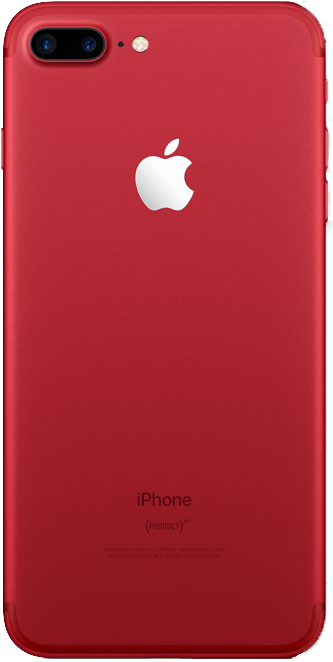
The iPhone 7 Plus uses Apple’s A10 Fusion chip and a 5.5-inch Retina HD display with IPS technology at 1920 × 1080 resolution and 401 ppi. It also includes dual 12MP rear cameras, a 7MP front camera, Touch ID, a Lightning connector, built-in stereo speakers, and IP67-rated splash, water, and dust resistance. Compared with earlier Plus models, the iPhone 7 Plus is faster, more water-resistant, and features dual rear cameras, stereo speakers, and a brighter wide-color display.

Because these components work together closely, faults can affect display, camera, charging, audio, and overall device performance. Our technicians inspect the phone carefully first and then carry out the required repair based on the actual fault found.
How We Evaluate iPhone 7 Plus Faults

Each iPhone 7 Plus is tested first so the repair matches the confirmed fault.

  • Screen and touch test
  • Battery and charging check
  • Camera test
  • Audio test
  • Signal and wireless check
  • Port inspection
  • Internal fault review
  • Software and hardware fault analysis

This helps us identify the exact fault and apply the right repair solution for the iPhone 7 plus.

iPhone 7 Plus Camera Repair: Dual Rear Camera Fault Analysis

The iPhone 7 Plus has dual 12MP rear cameras: wide-angle and telephoto. It supports 2x optical zoom, Portrait mode, optical image stabilization, and 4K video recording. Camera faults can affect focus, zoom, clarity, or video capture.

Camera Fault Symptoms
  • Camera not opening
  • Blurry photos
  • Focus not locking
  • Black camera view
  • Zoom not working properly
  • Front camera issue
How Camera Repair Is Handled
  • Test rear cameras
  • Test front camera
  • Inspect camera modules
  • Replace faulty parts
  • Check photo and video output

Display Glass and Touchscreen Repair

The iPhone 7 Plus has a 5.5-inch Retina HD LCD with IPS technology, wide color (P3), and 625 nits typical brightness. Screen damage can affect image output, touch response, and daily use.
Common Display Problems
  • Cracked front glass
  • Blank display
  • Touch not responding
  • Screen lines
  • Flickering image
  • Uneven brightness
How Screen Repair Is Done
  • Inspect screen condition
  • Test touch response
  • Check display connections
  • Replace screen if needed
  • Re-test display function

Home Button and Touch ID Repair

The iPhone 7 Plus uses Touch ID built into the Home button. If this area fails, unlocking and navigation can become unreliable.

Button and Touch ID Faults
  • No button response
  • Touch ID not reading
  • Intermittent response
  • Touch ID disabled
  • Home button function issue
Service Steps
  • Test button response
  • Check Touch ID function
  • Inspect related connections
  • Repair the confirmed fault
  • Verify normal operation

Battery Replacement and Power Repair

The iPhone 7 Plus uses a built-in rechargeable lithium-ion battery and charges through USB via the Lightning connector. Battery wear can cause fast drain, unstable charging, shutdowns, or heat buildup.
Battery and Power Issues
  • Fast battery drain
  • Sudden shutdown
  • Not charging
  • Intermittent charging
  • Heating during use
  • Swollen battery
How Power Faults Are Checked
  • Test battery condition
  • Check charging response
  • Monitor heat behavior
  • Replace battery if needed
  • Re-test power stability

Microphone Repair and Voice Input Service

The iPhone 7 Plus includes a built-in microphone for calls, Siri, recordings, and video. If the audio input path fails, voice pickup can become weak or stop entirely.

Microphone Fault We Address
  • Low voice volume
  • No call audio
  • No recording sound
  • Distorted input
  • Siri not hearing clearly
Repair Method
  • Test voice input
  • Check microphone path
  • Inspect related parts
  • Repair or replace the fault
  • Confirm clear audio

Speaker and Audio Output Repair

The iPhone 7 Plus uses built-in stereo speakers. Audio faults can reduce volume, distort sound, or affect speakerphone and media playback.

Speaker Problems We Fix
  • Low volume
  • Muffled sound
  • Crackling audio
  • No speaker output
  • Speakerphone issue
Audio Repair Steps
  • Test sound output
  • Inspect for blockage
  • Clean or replace speaker parts
  • Check related audio hardware
  • Confirm clear sound

Network, SIM and Signal Repair

The iPhone 7 Plus supports LTE, 802.11ac Wi-Fi with MIMO, Bluetooth 4.2, NFC, VoLTE, and Wi-Fi calling. Faults in the antenna path, SIM connection, or wireless hardware can affect calls, data, Wi-Fi, and pairing.

Signal and Network Symptoms
  • Weak signal
  • No service
  • SIM not detected
  • Dropped calls
  • Wi-Fi not working
  • Bluetooth instability
How Network Faults Are Diagnosed
  • Test signal and Wi-Fi
  • Check SIM response
  • Inspect antenna paths
  • Assess wireless hardware
  • Repair the confirmed fault

Charging Port and Lightning Connector Repair

The iPhone 7 Plus uses a Lightning connector for charging and wired connection. Dust, corrosion, or connector damage can make charging unstable or stop it completely.

Charging Fault Symptoms
  • Phone not charging
  • Loose cable fit
  • Charging at one angle only
  • Charging cuts in and out
  • Port visibly damaged
How Charging Is Restored
  • Inspect the charging port
  • Test power input
  • Clear debris if needed
  • Replace damaged connector
  • Re-check charging stability

Bluetooth Repair and Wireless Pairing Recovery

The iPhone 7 Plus supports Bluetooth 4.2. Bluetooth faults can interrupt pairing, wireless audio, and connection range.

Bluetooth Issues We Address
  • Devices not found
  • Pairing failure
  • Connection dropping
  • Audio cutting out
  • Weak Bluetooth range
Repair Process
  • Test Bluetooth function
  • Check wireless path
  • Inspect related hardware
  • Repair the faulty part
  • Re-test connection stability

Water Damage Cleaning and Internal Repair

The iPhone 7 Plus is rated IP67 for splash, water, and dust resistance, but liquid can still enter if seals are worn or impact has affected the housing. Water exposure can still damage charging, audio, display, and board functions.

Recovery Steps
  • Open and inspect the device
  • Check affected areas
  • Clean internal parts
  • Remove corrosion
  • Replace damaged parts
  • Run function testing

Logic Board and Chip-Level Repair

Board-level faults can affect multiple functions at once, including charging, audio, signal, and display. When the fault is not limited to an external part, chip-level diagnosis may be required.

Board Repair Steps
  • Inspect the logic board
  • Test for shorts
  • Check power lines
  • Inspect key components
  • Repair the fault point
  • Re-test main functions

Rear Housing & Frame Repair

The iPhone 7 Plus uses an aluminum enclosure. Drops can dent the rear housing, bend the frame, damage the antenna bands, or affect overall alignment and fit.
Housing Damage We Fix
  • Dented rear housing
  • Bent frame
  • Scratched casing
  • Antenna band damage
  • Poor fit after impact
How the Housing Is Restored
  • Inspect exterior damage
  • Check frame alignment
  • Remove damaged parts
  • Fit replacement housing if needed
  • Reassemble and check alignment

Overheating Diagnosis: Thermal System Evaluation

Overheating may result from excessive load, battery faults, or hardware inefficiencies. Thermal analysis helps determine the underlying cause.

Data Safety Protocol

Device storage remains protected wherever possible. Backup is recommended prior to service.

Post-Repair Quality Assurance

Every device undergoes:

Full functional testing

Sensor verification

Connectivity checks

Camera and audio testing

Thermal monitoring

This ensures reliable operation before return.

Expert repairing iPhone minor issues at professional mobile phone service center

Why Expert Repair Matters for Newer Devices

Modern smartphones integrate tightly coupled hardware and software systems. Improper repair can lead to:

Sensor calibration loss

Reduced performance

Battery safety risks

Long-term reliability issues

Precision repair preserves device longevity and functionality.

Frequently Asked Questions

1. How do you figure out what’s actually wrong with my iPhone before repairing it?
We start with a structured diagnostic process that checks hardware integrity, battery condition, thermal behavior, sensors, charging circuits, and software. This helps us identify the root cause instead of guessing based on symptoms. Once the issue is confirmed, we explain the findings and proceed with the appropriate repair.
Repairs are carried out in a way that preserves device storage wherever possible. Since some faults, especially power or logic board issues, can carry risk, we recommend backing up your data beforehand as a precaution. Our process is designed to minimize any impact on your information.
We handle a wide range of issues, including screen damage, battery problems, charging faults, camera issues, microphone or speaker problems, network and connectivity faults, overheating, water damage, and complex logic board repairs. If the problem isn’t obvious, our diagnostic process helps identify uncommon faults as well.

Yes. During diagnostics, we evaluate the device as a whole, since problems can sometimes be connected, for example, power issues affecting performance or connectivity. This approach helps ensure that underlying faults are identified and addressed rather than fixing only one symptom.

After completing the repair, the device goes through functional testing that includes checking sensors, connectivity, camera, audio, charging, and thermal behavior. This verification step helps confirm that the repair has restored stable operation before the device is returned.

What do I get from my iPhone Repair?

Call Us for Apple Door Step Support

We provide a door step service for your iPhone repair and service at dhoa, so no matter where you are, there is no excuse to not choose Apple Service and Repairs Center Way To Fix iphone repair service in qatar

100% Quality Parts

Our parts are of the highest quality and this allows us to offer you a limited warranty on the device for all parts, except the battery

No Minimum Services Charges

Diagnosis of your device is absolutely free of cost and there are no hidden charges whatsoever, for door step service contact us to get your device fixed.

Apple Premium service Centre

Apple Service and Repairs Center Way To Fix is the fastest and the best rated service provider for all Apple Service in Doha and Qatar. Select the device and the issue you wish to get repaired and watch how we bring your device back to life!

×