
iPhone 8 Repair Service Center in Doha

iPhone 8 Repair in Doha: Accurate Diagnostics & Dependable Repair

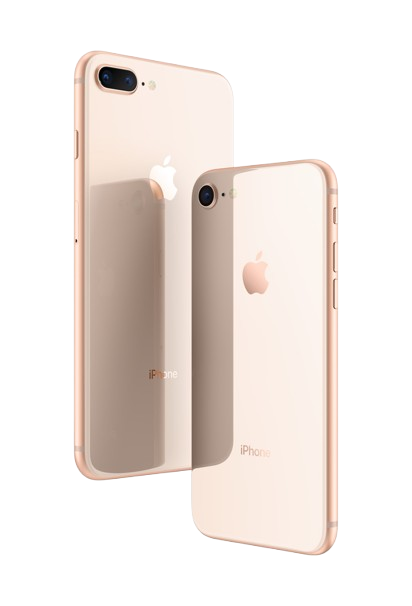
Behind the iPhone 8’s compact build lies a tightly integrated internal system. The A11 Bionic chip, 4.7-inch Retina HD display, Touch ID home button, and wireless charging coil all operate as a single connected architecture. A fault in one area can quietly compromise another. Every repair we carry out begins with a thorough diagnosis rather than a direct part swap.

Our technicians trace the issue to its source first, covering the display assembly, battery, charging circuit, camera, audio system, and logic board, before any component is touched.
Multi-Stage Diagnostic Process

Before any repair begins, our technicians carry out a structured diagnostic covering every critical system:

  • Display & touch response testing
  • Battery health & cycle analysis
  • Wireless & wired charging evaluation
  • Camera module inspection
  • Audio input & output testing
  • Logic board & power circuit diagnostics
Identifying the root cause before replacing any component is what prevents repeat faults and unnecessary costs.

Camera Repair: Single Lens Diagnostics & Sensor Restoration

The iPhone 8 carries a 12MP rear camera with optical image stabilization and phase-detection autofocus, paired with a 7MP front camera. Despite being a single-lens setup, camera faults on this device can run deep, tracing back to flex cable damage, sensor failure, impact stress, or a board-level communication break.
What We Commonly Fix
  • Shaky or unstable footage despite OIS being enabled
  • Autofocus not locking or hunting continuously
  • Camera app freezing or failing to open
  • Rear lens scratches or dust behind the glass
  • Front camera producing dim or distorted output
  • Flash not firing or flickering during use
How We Handle It
  • Physical teardown to assess module and surrounding components
  • Actuator and flex cable tested independently before any swap
  • Replacement carried out only where component failure is confirmed
  • Optical alignment checked and stabilization verified after reassembly

Display Glass and Touchscreen Repair

The iPhone 7 display assembly includes the front glass, LCD panel, and touch layer. A damaged display can affect more than appearance.

Common Display Problems
  • Broken or cracked front glass
  • No image on screen
  • Touch not responding correctly
  • Lines appearing on display
  • Flickering or unstable picture
  • Uneven light or dark patches
How Screen Repair Is Done
  • Examine the physical screen condition
  • Test touch sensitivity across the panel
  • Check display connector stability
  • Replace the damaged screen assembly if required
  • Test display quality and touch performance again

Every repair is confirmed through live camera testing across both front and rear before the device is returned.

Display & Touchscreen Repair: LCD Panel Integrity Restoration

The iPhone 8 uses a 4.7-inch IPS LCD Retina HD display with integrated touch layers and True Tone calibration. Impact or pressure damage can affect the screen’s visual output, touch accuracy, or backlight performance depending on where and how the damage occurred.

Symptoms Addressed
  • Front glass cracked or shattered on impact
  • Screen showing lines, blotches, or dead zones
  • Backlight uneven or fading at certain angles
  • Touch input delayed, erratic, or completely gone
  • True Tone not restoring after a previous repair
Repair Workflow
  • Display assembly removed and damage assessed in full
  • Replacement panel fitted using calibrated pressure tooling
  • True Tone profile transferred and touch layers recalibrated
  • Final output checked for color, brightness, and touch accuracy

Home Button & Touch ID Repair: Fingerprint Sensor Restoration

The iPhone 8 home button carries the same hardware-paired Touch ID sensor as its larger counterpart, directly tied to the logic board it shipped with. A fault here doesn’t just affect fingerprint recognition; it disrupts device unlock, Apple Pay, and basic navigation in one go.

What We Commonly Fix
  • Home button physically unresponsive or stuck
  • Touch ID failing to read or register fingerprints
  • Fingerprint sensor stopped working after a screen repair
  • Button click feel degraded or lost after impact
  • Touch ID greyed out in settings
How We Handle It
  • Button assembly and flex cable inspected for damage
  • Sensor pairing verified against the device logic board
  • Assembly replaced only where hardware failure is confirmed
  • Touch ID re-enrolled and click response tested post-repair

Battery Replacement & Power Management Repair

The iPhone 8 features wireless charging alongside its standard Lightning-based power system. Cell degradation, charging IC issues, or coil damage can each present differently.
Signs of Battery or Power Faults
  • Battery drain
  • Device shutting down before reaching low charge
  • Overheating during charging
  • Wireless charging not initiating or cutting out
  • Battery health percentage dropping rapidly
Service Includes
  • Battery drain
  • Device shutting down before reaching low charge
  • Overheating during charging
  • Wireless charging not initiating or cutting out
  • Battery health percentage dropping rapidly

Microphone & Audio Input Repair

The iPhone 8 is equipped with multiple microphones handling calls, video recording, and noise cancellation. Debris buildup, liquid exposure, or flex cable damage can affect input quality across any of these functions.
What We Commonly Fix
  • Caller unable to hear you during calls
  • Voice input muffled or cutting in and out
  • Microphone inactive during video recording
  • Siri not responding to voice commands
  • Background noise not filtered during calls
How We Handle It
  • Each microphone tested individually for input clarity
  • Flex cable and connector inspected for damage
  • Port cleaned and cleared of debris where blocked
  • Component replaced where hardware failure is confirmed
  • All three microphones verified post-repair under real conditions
Post-repair verification confirms stable input across all three microphones.

Speaker & Audio Output Repair

The iPhone 8 delivers stereo audio through its bottom speaker and earpiece. Dust, liquid, or impact damage can affect either channel independently.
Problems We Fix
  • Low or distorted audio during playback
  • No sound from speaker or earpiece
  • Crackling or buzzing at higher volumes
  • One channel working but not the other
  • Audio cutting out during calls
How We Approach It
  • Speaker grille cleaned and inspected
  • Both channels tested independently
  • Flex cable and connector diagnostics
  • Module replaced where damage is confirmed
  • Audio output verified post-repair

Network & Signal Repair

The iPhone 8 supports LTE connectivity through its built-in antenna system and Qualcomm modem. Signal faults are due to antenna damage, SIM reader wear, or board-level RF circuit issues, often triggered by impact or liquid exposure.
Issues We Resolve
  • Weak or dropping cellular signal
  • Calls failing to connect or cutting out
  • SIM card not detected or showing no service
  • Mobile data not connecting despite signal present
  • No service after liquid exposure or physical damage
Our Repair Process
  • Antenna band and connector inspection
  • SIM tray and reader diagnostics
  • RF circuit and board-level checks
  • Live network and call testing post-repair

Charging Port & Connectivity Repair

The iPhone 8 supports both Lightning and wireless charging, two separate systems that can fail independently. Port wear, debris buildup, or liquid damage are the most common causes.

Issues We Resolve
  • Not charging via cable or wirelessly
  • Cable fitting loosely or not staying connected
  • Data sync not recognized
  • Port corroded or physically damaged

Bluetooth & Wireless Connectivity Repair

The iPhone 8 handles Bluetooth and Wi-Fi through a combined wireless module on the logic board. A fault in this chip affects both functions simultaneously and typically points to board-level damage rather than a simple software fix.

Issues We Resolve
  • Bluetooth not turning on or greyed out
  • Devices not pairing or dropping connection
  • Audio cutting out during streaming
  • Wi-Fi not detecting networks
  • Weak or unstable wireless signal
Our Repair Process
  • Wireless module and antenna inspection
  • Board-level circuit diagnostics
  • Software and firmware conflict checks
  • Component replacement where required
  • Post-repair pairing and connectivity testing

Water Damage Recovery: Corrosion Treatment & System Restoration

Liquid exposure on the iPhone 8 can compromise multiple systems at once, from the charging circuit to the logic board. Early intervention limits corrosion spread and improves recovery outcomes.
What We Perform
  • Full device disassembly and damage assessment
  • Ultrasonic cleaning of affected components
  • Corrosion removal from board and connectors
  • Component-level drying and treatment
  • System-wide functionality testing post-recovery

Logic Board & Chip Repair

The iPhone 8 logic board houses the A11 Bionic chip, power management ICs, and all core processing circuits. Board-level faults require precision micro-soldering and component-level diagnosis.
Issues We Resolve
  • Device not powering on
  • Random restarts or freezing
  • Touch ID not functioning after board fault
  • No image on display despite device being on
  • Overheating from power management IC failure
  • Data recovery from boards with physical damage

Rear Housing & Frame Repair: Glass Back & Structural Restoration

The iPhone 8 carries a glass back panel that supports wireless charging but is prone to cracking and shattering from impact, more so than a standard aluminum casing.
Issues We Resolve
  • Cracked or shattered rear glass
  • Scratched or scuffed outer casing
  • Bent or misaligned aluminum frame
  • Damaged camera lens cover
  • Frame separation after impact
Our Repair Process
  • Rear glass inspection and full replacement
  • Aluminum frame realignment where required
  • Internal component check for impact-related damage
  • Adhesive resealing for dust and moisture resistance
  • Post-repair structural integrity verification

Post-repair testing ensures secure panel fit, stable charging performance, and restored structural integrity.

Overheating Diagnosis: Thermal System Evaluation

Overheating may result from excessive load, battery faults, or hardware inefficiencies. Thermal analysis helps determine the underlying cause.

Data Safety Protocol

Device storage remains protected wherever possible. Backup is recommended prior to service.

Post-Repair Quality Assurance

Every device undergoes:

Full functional testing

Sensor verification

Connectivity checks

Camera and audio testing

Thermal monitoring

This ensures reliable operation before return.

Expert repairing iPhone minor issues at professional mobile phone service center

Why Expert Repair Matters for Newer Devices

Modern smartphones integrate tightly coupled hardware and software systems. Improper repair can lead to:

Sensor calibration loss

Reduced performance

Battery safety risks

Long-term reliability issues

Precision repair preserves device longevity and functionality.

Frequently Asked Questions

1. How do you figure out what’s actually wrong with my iPhone before repairing it?
We start with a structured diagnostic process that checks hardware integrity, battery condition, thermal behavior, sensors, charging circuits, and software. This helps us identify the root cause instead of guessing based on symptoms. Once the issue is confirmed, we explain the findings and proceed with the appropriate repair.
Repairs are carried out in a way that preserves device storage wherever possible. Since some faults, especially power or logic board issues, can carry risk, we recommend backing up your data beforehand as a precaution. Our process is designed to minimize any impact on your information.
We handle a wide range of issues, including screen damage, battery problems, charging faults, camera issues, microphone or speaker problems, network and connectivity faults, overheating, water damage, and complex logic board repairs. If the problem isn’t obvious, our diagnostic process helps identify uncommon faults as well.

Yes. During diagnostics, we evaluate the device as a whole, since problems can sometimes be connected, for example, power issues affecting performance or connectivity. This approach helps ensure that underlying faults are identified and addressed rather than fixing only one symptom.

After completing the repair, the device goes through functional testing that includes checking sensors, connectivity, camera, audio, charging, and thermal behavior. This verification step helps confirm that the repair has restored stable operation before the device is returned.

What do I get from my iPhone Repair?

Call Us for Apple Door Step Support

We provide a door step service for your iPhone repair and service at dhoa, so no matter where you are, there is no excuse to not choose Apple Service and Repairs Center Way To Fix iphone repair service in qatar

100% Quality Parts

Our parts are of the highest quality and this allows us to offer you a limited warranty on the device for all parts, except the battery

No Minimum Services Charges

Diagnosis of your device is absolutely free of cost and there are no hidden charges whatsoever, for door step service contact us to get your device fixed.

Apple Premium service Centre

Apple Service and Repairs Center Way To Fix is the fastest and the best rated service provider for all Apple Service in Doha and Qatar. Select the device and the issue you wish to get repaired and watch how we bring your device back to life!

×