
Complete iPad 9.7 Repair Solutions in Doha

iPad 9.7 Diagnosis and Repair Services in Doha

The iPad Pro 9.7- is a premium compact tablet with features such as a Retina display, True Tone, Apple Pencil support, Touch ID, and the A9X chip. Even with strong hardware, long-term use can lead to issues involving the screen, battery, charging system, buttons, audio, cameras, or internal components, especially when the device has been exposed to drops, daily wear, or power-related strain.

Our iPad 9.7 diagnosis and repair services are designed to assess the device carefully before any repair work is carried out. Instead of treating only the visible symptom, the inspection process helps identify whether the fault is linked to the display assembly, battery performance, charging port, software behavior, connectivity functions, or internal board-level damage, so the repair plan is based on the actual condition of the device.

IPad9 7 - Apple Service and Repairs Center

Detailed Diagnostic Assessment for iPad 9.7

Proper diagnosis is important before repair, especially when one issue may affect multiple internal functions.

Repair Process Includes

  • Initial device inspection
  • Testing of power, charging, battery, and heating behavior
  • Checks for display, camera, audio, connectivity, and software issues
  • Evaluation of Home button, Touch ID, Apple Pencil support, and Lightning port function
  • Identification of the actual fault
  • Reduced risk of incorrect diagnosis or unnecessary replacement

iPad 9.7 Screen Repair

The iPad 9.7 features a Retina display designed for clear visuals and smooth touch response. When the screen is damaged or not performing properly, it can affect both viewing quality and normal day-to-day use.
Common Display Issues
  • Cracked or broken screen
  • Touch not responding properly
  • Flickering display
  • Lines or black spots on the screen
  • Dim or uneven brightness
  • Ghost touch issues
  • Blank display or no image
  • Screen freezing during use
Repair Process Includes
  • Inspection of screen and touch condition
  • Testing of display clarity and responsiveness
  • Checks for internal display-related faults
  • Diagnosis of glass, touch, or panel issues
  • Repair planning based on the screen condition

iPad 9.7 Camera Repair

The iPad Pro 9.7-inch includes a 12MP rear camera with autofocus and 4K video support, along with a 5MP front camera for FaceTime and selfies. When camera-related faults appear, they can affect image quality, video use, scanning, and normal camera app performance.
Common Camera Issues We Resolve
  • Rear or front camera not opening
  • Blurry or unfocused images
  • Black screen in the Camera app
  • Video recording not working properly
  • Camera freezing or lagging during use
  • Flash not responding as expected
Repair Process
  • Front and rear camera testing
  • Focus and image-quality checks
  • Camera app and video function inspection
  • Internal camera module and connector checks
  • Fault diagnosis before repair planning

Home Button and Touch ID Repair

The iPad Pro 9.7-inch includes a Touch ID sensor built into the Home button. When this area develops a fault, it can affect unlocking, app authentication, navigation, and normal button response.
Common Issues We Resolve
  • Home button not responding
  • Intermittent button function
  • Touch ID not recognizing fingerprints
  • Unlock or authentication failure
  • Delayed response when pressing the button
  • Home button issues after impact or wear
Repair Process Includes
  • Testing of Home button response
  • Touch ID function evaluation
  • Inspection for physical or internal connection issues
  • Diagnosis of button-related performance faults
  • Repair planning based on the device condition

Apple Pencil Support and Input Troubleshooting

Pencil does not respond properly, the problem may be linked to pairing, charging, touch input, or related device functions.

Common Issues We Resolve
  • Apple Pencil not pairing properly
  • Pencil disconnecting during use
  • Pencil not charging through Lightning
  • Input delay or lag on screen
  • Writing or drawing not registering correctly
  • Inconsistent response during use
Repair Process
  • Pairing and charging checks
  • Input response testing
  • Lightning connection inspection
  • Touch and accessory-related diagnosis
  • Hardware and software evaluation where needed

Volume Button Repair

Volume button faults can affect sound control and normal device use.

Common Issues We Resolve
  • Volume up button not working
  • Volume down button not working
  • Buttons stuck or hard to press
  • Intermittent response
  • No response when pressed
Repair Process Includes
  • Button response testing
  • Physical condition and alignment check
  • Inspection of internal button-related connections
  • Diagnosis of the underlying fault

iPad 9.7 Headphone Jack Repair

The iPad 9.7 includes a headphone jack for wired audio. Port damage or debris can disrupt sound output and headphone detection.
Common Issues We Resolve
  • No sound through wired headphones
  • Audio only from one side
  • Crackling or distorted sound
  • Headphones not detected
  • Jack feeling loose or damaged
Repair Process Includes
  • Jack detection and audio output testing
  • Port condition and debris inspection
  • Internal audio path review

Power and Startup Repair

Power-related faults can prevent the iPad 9.7 from turning on or operating normally.

Common Software Issues We Resolve
  • iPad not turning on
  • Stuck on the Apple logo
  • Random shutdowns
  • Restart loop issues
  • No response when pressing the power button
  • Device turning off even with battery charge
Repair Process Includes
  • Power button response testing
  • Startup and shutdown behavior checks
  • Battery and charging evaluation
  • Inspection for internal power-related faults
  • Diagnosis of the cause before repair planning

Software Troubleshooting and Repair

Software-related problems can affect the overall performance and stability of the iPad 9.7.
Common Issues We Resolve
  • iPad running slowly
  • Apps crashing repeatedly
  • iOS update or restore errors
  • Device freezing during use
  • Stuck on startup or recovery screen
  • Unusual software glitches or instability
Repair Process Includes
  • Software condition assessment
  • System performance checks
  • Update and restore evaluation
  • App and operating system fault diagnosis

iPad 9.7 Battery Replacement

Battery-related faults can affect charging consistency, backup time, and overall device stability on the iPad 9.7.

Common Issues We Resolve
  • Fast battery drain
  • Charging failure or inconsistent charging
  • Sudden drops in battery percentage
  • Unexpected shutdowns
  • Device working only when connected to power
  • Unstable charging behavior
Repair Process
  • Battery health evaluation
  • Charging and power diagnostics
  • Internal battery inspection
  • Battery replacement where needed

Speaker and Audio Repair

Audio issues can affect media playback, calls, alerts, recordings, and overall device use

Common Issues We Resolve
  • Speaker not working
  • Low or distorted sound
  • No audio during playback
  • Sound cutting in and out
  • Audio problems during calls or media use
  • Uneven or unclear sound output
Repair Process Includes
  • Speaker function testing
  • Audio output checks
  • Internal audio-related inspection

Lightning Charging Port Repair

The Lightning port on the iPad 9.7 plays a key role in charging, syncing, and accessory connection

Common Charging Port Issues We Resolve
  • iPad not charging properly
  • Loose charging connection
  • Cable only works at a certain angle
  • Slow or interrupted charging
  • iPad not detected when connected
  • Accessory connection issues through the port
Repair Process Includes
  • Charging port inspection
  • Charging response and cable connection testing
  • Checks for dirt, damage, or internal port faults
  • Evaluation of port-related connection issues

Wi-Fi and Bluetooth Connectivity Troubleshooting

Connection issues on the iPad 9.7 can affect internet access, wireless pairing, and everyday device use.

Common Connectivity Issues We Resolve
  • Wi-Fi not connecting
  • Weak or unstable Wi-Fi signal
  • Bluetooth not pairing
  • Frequent connection drops
  • iPad not detecting nearby devices
  • Slow or interrupted wireless performance
Repair Process Includes
  • Wi-Fi and Bluetooth function testing
  • Signal and connection stability checks
  • Inspection of settings and wireless behavior
  • Diagnosis of hardware or software-related connectivity faults

Water Damage Recovery and Internal Moisture Repair

Liquid exposure can affect multiple internal parts of the iPad 9.7 and may lead to short circuits, corrosion, or unstable performance.
Repair Process Includes
  • iPad not turning on after liquid exposure
  • Charging issues after water damage
  • Screen or touch problems after moisture contact
  • Audio or camera faults caused by internal moisture
  • Overheating or unstable device behavior
  • Corrosion-related internal damage

Logic Board and Chip-Level Repair

Logic board faults on the iPad 9.7 can affect power, charging, display response, connectivity, and overall device function.

Repair Process Includes
  • iPad not turning on
  • No charging response
  • Restarting or shutting down unexpectedly
  • No display despite power activity
  • Touch or accessory-related board faults
  • Internal component failure affecting normal use

Housing, Frame and Back Panel Repair

Physical damage to the outer body of the iPad 9.7 can affect both appearance and overall device handling.
Common Issues We Resolve
  • Bent or damaged frame
  • Dented back panel
  • Body deformation after impact
  • Misaligned screen due to frame damage
  • External wear affecting normal use
  • Loose or damaged outer casing parts
Repair Process Includes
  • Inspection of frame and body condition
  • Assessment of back panel damage
  • Checks for alignment and structural impact
  • Diagnosis of external damage affecting device use
  • Repair planning based on the housing condition

Overheating Diagnosis: Thermal System

Overheating may result from heavy usage, battery faults, charging issues, or internal hardware inefficiencies. Thermal evaluation helps identify the underlying cause and supports accurate repair.

Data Safety Protocol

Device storage remains protected wherever possible during repair. As a precaution, backup is recommended prior to service.

Post-Repair Quality Assurance

Every device undergoes:

Full functional testing

Sensor verification

Connectivity checks

Camera and audio testing

Thermal monitoring

This helps ensure reliable operation before return.
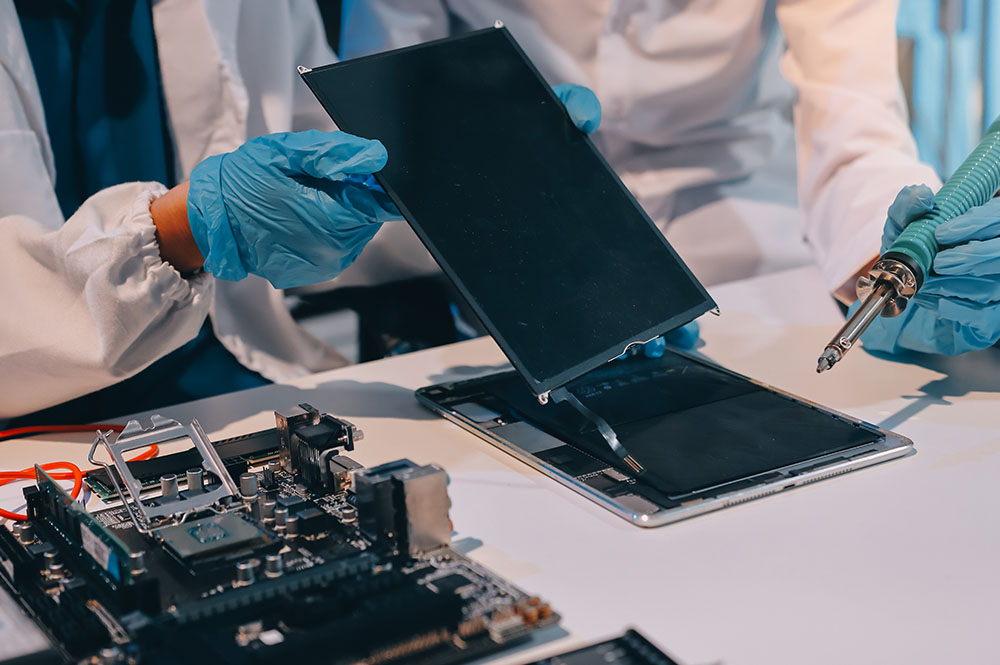
QA IPad - Apple Service and Repairs Center

Why Expert Repair Matters for iPad Devices

Modern iPads integrate closely connected hardware and software systems. Improper repair can lead to:

Sensor calibration loss

Reduced performance

Battery safety risks

Long-term reliability issues

Precision repair helps preserve device longevity and stable functionality.

Frequently Asked Questions

1. How do you figure out what’s actually wrong with my iPad before repairing it?

We begin with a structured diagnostic process that checks hardware condition, battery performance, thermal behavior, sensors, charging function, and software stability. This helps identify the root cause instead of relying only on visible symptoms. Once the issue is confirmed, the appropriate repair solution can be carried out.

Repairs are handled in a way that protects device storage wherever possible. Since certain problems, especially power-related or logic board faults, may involve some risk, backing up your data beforehand is always recommended. The repair process is approached carefully to reduce any impact on stored information.

A wide range of iPad issues can be addressed, including screen damage, battery problems, charging faults, camera issues, speaker or microphone failure, network and connectivity problems, overheating, water damage, and logic board faults. If the issue is unclear, diagnostic testing helps identify less obvious hardware or internal defects.

Yes. During diagnosis, the device is evaluated as a whole because multiple faults can sometimes be linked. For example, battery or charging problems may also affect performance, heat levels, or connectivity. This approach helps ensure that the full condition of the iPad is assessed instead of focusing on only one symptom.

After repair, the device goes through functional testing to verify key features such as sensors, connectivity, camera, audio, charging, and thermal behavior. This final evaluation helps confirm that the repair has restored proper operation and that the iPad is ready for reliable everyday use.

What do I get from my iPad repair?

Call Us for Apple Door Step Support

We provide a door step service for your iPad repair and service at dhoa, so no matter where you are, there is no excuse to not choose Apple Service and Repairs Center Way To Fix iPad repair service in qatar

100% Quality Parts

Our parts are of the highest quality and this allows us to offer you a limited warranty on the device for all parts, except the battery

No Minimum Services Charges

Diagnosis of your device is absolutely free of cost and there are no hidden charges whatsoever, for door step service contact us to get your device fixed.

Apple Premium service Centre

Apple Service and Repairs Center Way To Fix is the fastest and the best rated service provider for all Apple Service in Doha and Qatar. Select the device and the issue you wish to get repaired and watch how we bring your device back to life!

×