
iPad mini 3 Repair Service Center in Doha

iPad mini 3 Repair and Hardware Service in Doha

The iPad mini 3 brought meaningful upgrades over its predecessor — Touch ID built into the Home button, Apple Pay support, an improved 5MP iSight camera, and Gold as a new finish option. These additions make it a more capable device, but they also introduce specific hardware components that require specialist knowledge when repairs are needed.

Our repair service in Doha covers the full range of iPad mini 3 hardware faults. Whether the issue involves the Retina display, Touch ID sensor, battery, cameras, or internal board, each device is assessed and serviced with the component-level care its build requires.

iPad mini 3 Pre-Repair Diagnostic Process

Before any repair is carried out, the iPad mini 3 undergoes a structured hardware assessment. This step identifies the actual fault rather than addressing surface symptoms, which reduces the chance of misdiagnosis or incomplete repair.

What the Diagnostic Covers

  • External body and port condition
  • Touch ID sensor response and fingerprint recognition
  • Display integrity and touch layer performance
  • Battery health, charge cycle status, and thermal behavior
  • Rear iSight and front FaceTime HD camera function
  • Speaker, microphone, and headphone jack output
  • Wi-Fi, Bluetooth, and cellular connectivity (where applicable)
  • Lightning port charging and data response
  • iOS software stability and boot behavior

iPad mini 3 Display and Screen Repair

The iPad mini 3 uses a 7.9-inch Retina display with a 2048-by-1536 resolution at 326 ppi and an IPS panel with oleophobic coating. Damage to the front glass or display assembly can reduce touch sensitivity, cause visual distortion, or make the screen unresponsive entirely.

Common Screen Issues
  • Cracked or broken front screen
  • Touch not working properly
  • Display flickering
  • Lines or black spots on screen
  • Blank screen
  • Low or uneven brightness
  • Ghost touch issues
  • Screen freezing during use
What the Screen Check Includes
  • Front screen inspection
  • Touch function testing
  • Display quality check
  • Screen assembly assessment
  • Repair recommendation based on the fault

iPad mini 3 Camera Repair

The iPad mini 3 includes a 5MP rear iSight camera with autofocus, HDR, and panorama support, and a 1.2MP front FaceTime HD camera with 720p video. Camera-related issues can affect photos, video recording, and video calls.

Common Camera Issues We Resolve
  • Rear camera not opening
  • Front FaceTime HD camera not working
  • Blurry or out-of-focus images
  • Black screen in camera mode
  • Camera app freezing
  • Autofocus not working properly
  • HDR or flash not functioning
Repair Process Includes
  • Front and rear camera check
  • Camera opening and response test
  • Image clarity and focus inspection
  • Video recording quality review
  • Service based on the camera fault

iPad mini 3 Touch ID and Home Button Repair

The iPad mini 3 introduced Touch ID — a fingerprint identity sensor built into the Home button. Touch ID enables secure unlocking and Apple Pay authentication, so any fault can affect device access, payments, and navigation.
Common Touch ID and Home Button Issues
  • Touch ID not recognising fingerprint
  • Home button not responding
  • Hard or stuck button press
  • Delayed or intermittent response
  • Touch ID failing to enroll fingerprints
  • Apple Pay not authenticating via Touch ID
  • Physical button damage
Repair Process
  • Touch ID sensor function check
  • Home button response and press testing
  • Fingerprint recognition testing
  • External button condition inspection
  • Service based on the Touch ID or Home button issue

iPad mini 3 Volume Button Repair

The volume buttons control sound during calls, media playback, and alerts. Button faults can affect normal audio adjustment.

Common Issues We Resolve
  • Volume button not responding
  • Volume increasing or decreasing automatically
  • Hard or stuck button press
  • Delayed response
  • Inconsistent volume control
  • Physical button damage
Repair Process
  • Volume button function check
  • Button response testing
  • External button condition inspection
  • Audio control behavior review
  • Service based on the volume issue

iPad mini 3 Power and Startup Repair

Power and startup issues can stop the iPad mini 3 from turning on properly or interrupt normal device use.
Common Issues We Resolve
  • iPad not turning on
  • Stuck on Apple logo
  • Random restarts
  • Device shutting down suddenly
  • Screen staying black on startup
  • No response when pressing the power button
Repair Process Includes
  • Power button response check
  • Startup behavior inspection
  • Charging and power flow testing
  • Shutdown and restart pattern review
  • Service based on the power issue

iPad mini 3 Software Troubleshooting

Software faults on the iPad mini 4 can develop after an iOS update, a failed restore, or gradual system degradation over time.
Problems We Resolve
  • iPad freezing during use
  • Apps crashing frequently
  • Slow performance
  • Stuck on update or restore screen
  • iOS system lag or unresponsive behavior
  • Device restarting during use

iPad mini 3 Battery Repair

The iPad mini 3 uses a built-in battery rated for up to 10 hours of use. Battery problems can affect backup time, charging behavior, and overall reliability.

Common Battery Issues
  • Battery draining quickly
  • iPad not charging properly
  • Sudden shutdowns
  • Battery percentage dropping fast
  • Slow charging response
  • Heating during charging or use
Repair Process Includes
  • Battery performance check
  • Charging behavior inspection
  • Backup and drain pattern review
  • Power stability testing
  • Service based on the battery issue

iPad mini 3 Microphone Repair

The iPad mini 3 has dual microphones. Microphone problems can affect voice recording, FaceTime calls, and audio input during normal use.
Common Microphone Issues
  • Low voice pickup
  • No sound during recording
  • Microphone not working in calls
  • Distorted audio input
  • Intermittent microphone response
  • Audio recording problems
Repair Process Includes
  • Microphone function check
  • Audio input testing
  • Voice clarity inspection
  • Recording performance review

iPad mini 3 Speaker Repair

Speaker problems can affect audio output during calls, videos, music, and alerts.

Common Microphone Issues
  • Low sound output
  • No sound from speaker
  • Distorted or unclear audio
  • Crackling sound
  • Speaker working intermittently
  • Sound cutting during use
Repair Process
  • Speaker output check
  • Sound clarity testing
  • Audio playback inspection
  • Volume performance review

iPad mini 3 Charging Port Repair

The iPad mini 3 uses a Lightning connector for charging and data. Port-related issues can affect power flow and device connectivity.

Common Charging Port Issues
  • iPad not charging properly
  • Loose charging connection
  • Cable not fitting correctly
  • Charging stopping intermittently
  • Slow charging response
  • No connection with charger or computer
Repair Process Includes
  • Lightning port condition check
  • Charging response testing
  • Cable connection inspection
  • Power input review

iPad mini 3 Headphone Jack Repair

The iPad mini 3 includes a 3.5mm stereo headphone jack. Faults can interrupt sound output during music, calls, and media playback.

Common Headphone Jack Issues
  • No sound through headphones
  • Audio from one side only
  • Loose headphone connection
  • Distorted headphone sound
  • Headphones not detected
  • Sound cutting during use
Repair Process Includes
  • Headphone jack condition check
  • Wired audio output test
  • Headphone detection inspection
  • Sound balance verification
  • Fault-specific correction steps

iPad mini 3 Water Damage Repair

Liquid exposure can affect different internal functions of the iPad mini 3, including power, charging, display, audio, and touch performance.

Problems We Resolve
  • iPad not turning on after water exposure
  • Charging failure after liquid contact
  • No sound or distorted audio
  • Display problems after moisture entry
  • Touch or Touch ID not working properly
  • Corrosion-related internal faults

Logic Board and Chip-Level Repair

Logic board faults can affect major functions of the iPad mini 3, including power, charging, display response, and overall device operation. The A7 chip with 64-bit architecture and M7 motion coprocessor are central to device performance.
Problems We Resolve
  • iPad not turning on
  • No charging response
  • Stuck on Apple logo
  • No display output
  • Touch or Touch ID failure caused by board issues
  • Intermittent power problems

iPad mini 3 Body and Frame Repair

Physical damage to the outer body of the iPad mini 3 can affect its appearance, screen fitting, button alignment, and overall handling.

Common Body Damage Issues
  • Bent or dented body
  • Damaged back panel
  • Frame misalignment
  • Loose screen fitting
  • Corner impact damage
  • External casing wear or damage
Repair Process Includes
  • Outer body condition check
  • Frame alignment inspection
  • Back panel damage assessment
  • Screen fitting evaluation

Overheating Diagnosis: Thermal System

Overheating may result from heavy usage, battery faults, charging issues, or internal hardware inefficiencies. Thermal evaluation helps identify the underlying cause and supports accurate repair.

Data Safety Protocol

Device storage remains protected wherever possible during repair. As a precaution, backup is recommended prior to service.

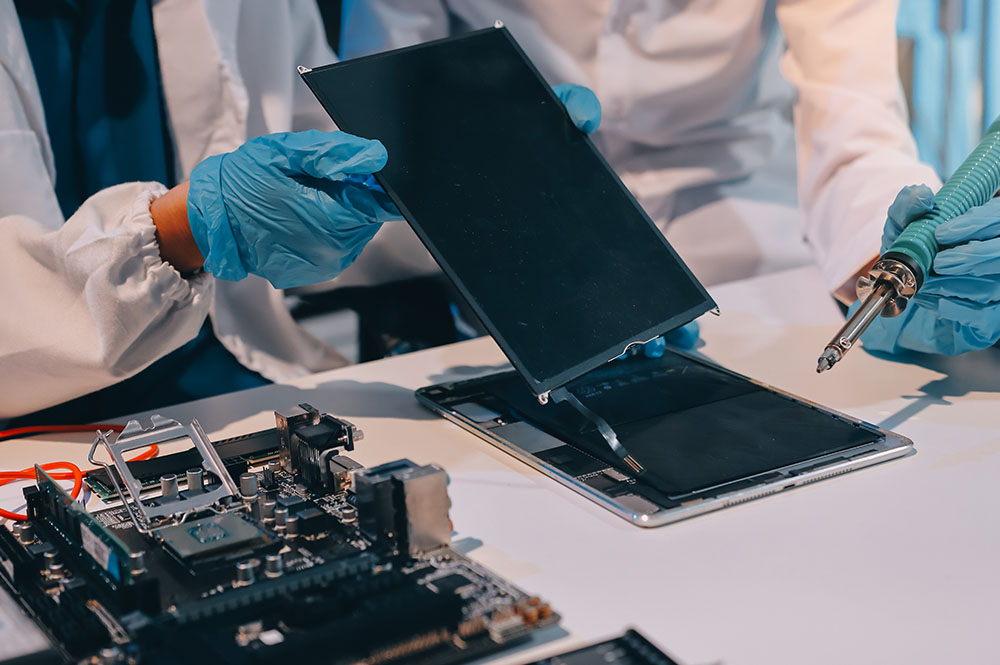
Post-Repair Quality Assurance

Every device undergoes:

Full functional testing

Sensor verification

Connectivity checks

Camera and audio testing

Thermal monitoring

This helps ensure reliable operation before return.
Why Expert Repair Matters for iPad Devices

Modern iPads integrate closely connected hardware and software systems. Improper repair can lead to:

Sensor calibration loss

Reduced performance

Battery safety risks

Long-term reliability issues

Precision repair helps preserve device longevity and stable functionality.

Frequently Asked Questions

1. How do you figure out what’s actually wrong with my iPad before repairing it?

We begin with a structured diagnostic process that checks hardware condition, battery performance, thermal behavior, sensors, charging function, and software stability. This helps identify the root cause instead of relying only on visible symptoms. Once the issue is confirmed, the appropriate repair solution can be carried out.

Repairs are handled in a way that protects device storage wherever possible. Since certain problems, especially power-related or logic board faults, may involve some risk, backing up your data beforehand is always recommended. The repair process is approached carefully to reduce any impact on stored information.

A wide range of iPad issues can be addressed, including screen damage, battery problems, charging faults, camera issues, speaker or microphone failure, network and connectivity problems, overheating, water damage, and logic board faults. If the issue is unclear, diagnostic testing helps identify less obvious hardware or internal defects.

Yes. During diagnosis, the device is evaluated as a whole because multiple faults can sometimes be linked. For example, battery or charging problems may also affect performance, heat levels, or connectivity. This approach helps ensure that the full condition of the iPad is assessed instead of focusing on only one symptom.

After repair, the device goes through functional testing to verify key features such as sensors, connectivity, camera, audio, charging, and thermal behavior. This final evaluation helps confirm that the repair has restored proper operation and that the iPad is ready for reliable everyday use.

What do I get from my iPad repair?

Call Us for Apple Door Step Support

We provide a door step service for your iPad repair and service at dhoa, so no matter where you are, there is no excuse to not choose Apple Service and Repairs Center Way To Fix iPad repair service in qatar

100% Quality Parts

Our parts are of the highest quality and this allows us to offer you a limited warranty on the device for all parts, except the battery

No Minimum Services Charges

Diagnosis of your device is absolutely free of cost and there are no hidden charges whatsoever, for door step service contact us to get your device fixed.

Apple Premium service Centre

Apple Service and Repairs Center Way To Fix is the fastest and the best rated service provider for all Apple Service in Doha and Qatar. Select the device and the issue you wish to get repaired and watch how we bring your device back to life!

×