
iPhone Air Repair Service

iPhone Air Service Center in Doha: Expert Diagnostics & Precision Repair

The iPhone Air is powered by the A19 Pro chip and features a 6.5-inch Super Retina XDR OLED display with ProMotion technology, Dynamic Island, HDR support, and True Tone. It includes a 48MP Fusion camera system, Face ID powered by the TrueDepth front camera, and a built-in rechargeable lithium-ion battery. Its ultra-thin titanium design and tightly integrated hardware and software architecture require professional tools, controlled procedures, and accurate diagnostics to ensure safe and reliable repair.

Our service approach focuses on identifying the exact root cause of faults before replacing any components. Whether the issue involves display damage, camera malfunction, charging instability, connectivity failure, or board-level defects, each repair follows structured protocols and post-service verification to restore performance and long-term reliability.

Turnaround time depends on repair complexity and parts availability, while quality and device safety remain the priority.
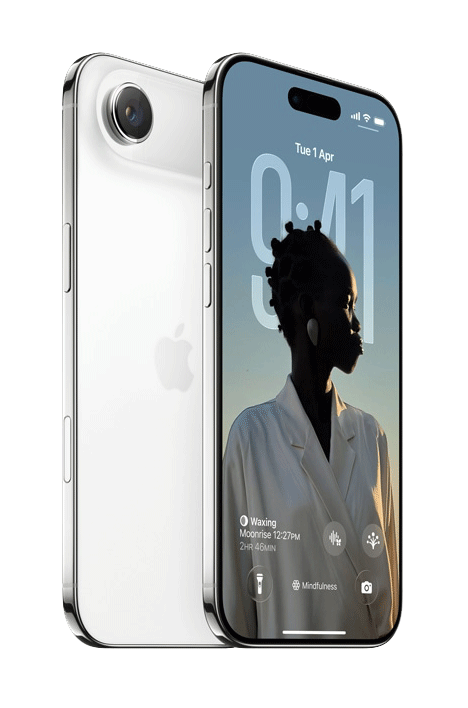
Comprehensive Diagnostic Process Process – iPhone Air

Before initiating repairs, we conduct a structured multi-point diagnostic evaluation to isolate faults precisely. The iPhone Air integrates advanced processing hardware, AI-driven imaging systems, and high-refresh-rate display technology, making accurate diagnostics essential before performing any component replacement.

Diagnostic Assessment Includes

  • Display brightness, color accuracy, ProMotion refresh rate, and Dynamic Island functionality testing
  • Battery health and charging performance analysis
  • Logic board power rail inspection
  • Face ID and TrueDepth camera functionality checks
  • Camera performance and image stabilization testing
  • Cellular network, Wi-Fi, Bluetooth, and GPS verification
  • Software integrity and system diagnostics

This method ensures accurate fault identification, especially important in devices where internal systems are tightly integrated.

iPhone Air Camera Repair – Detailed Fault Analysis & Calibration

The iPhone Air features a 48MP Fusion camera system designed to capture high-resolution photos and advanced computational photography with technologies such as Photonic Engine, Smart HDR, and Night mode. Camera faults may occur due to module damage, autofocus errors, flex cable disconnection, sensor misalignment, or board-level communication issues.

Common Camera Issues Resolved
  • Blurry or unfocused images
  • Black screen when opening the Camera app
  • Flash not functioning
  • Shaky or unstable video recording
  • Front or rear camera not working
  • Camera app crashes
  • Rear glass damage affecting lens alignment
Repair Process Includes
  • Camera module inspection
  • Flex cable and connector testing
  • Replacement of defective camera modules (if required)
  • Autofocus and stabilization verification
  • Sensor alignment calibration
  • Imaging software validation

Post-repair testing confirms clear focus, stable video capture, accurate exposure, and integration with iOS camera features.

Display & Touchscreen Repair

The 6.5-inch Super Retina XDR OLED display supports ProMotion adaptive refresh rates up to 120Hz, HDR, True Tone, and Dynamic Island functionality. Physical damage or internal panel faults can affect display clarity, brightness levels, and touch responsiveness.
Symptoms Addressed
  • Cracked or shattered front glass
  • No display or black screen
  • Dead pixels or lines on screen
  • Flickering or brightness fluctuations
  • Touch unresponsiveness or ghost touches
Repair Workflow
  • Precision display removal
  • Sensor data transfer (where applicable)
  • Brightness and color calibration testing
  • Multi-touch and gesture response verification

Battery Replacement & Power System Repair

The iPhone Air includes a built-in rechargeable lithium-ion battery designed to deliver extended battery life and fast charging capabilities. Battery or power system faults can affect charging stability, runtime, and overall device reliability.

Signs of Battery or Power Issues
  • Device not powering on
  • Rapid battery drain
  • Unexpected shutdowns
  • Overheating during normal usage
  • Boot loop or stuck on Apple logo
  • Slow or inconsistent charging
Service Includes
  • Battery and charging diagnostics
  • Safe battery replacement
  • Charging circuit inspection
  • Power stability testing
  • Thermal monitoring after installation

Microphone & Audio Input Repair

The iPhone Air uses multiple microphones to support voice calls, video recording, Siri commands, and noise cancellation. Faulty microphones can affect audio clarity and voice capture during calls or recordings.

Common Symptoms
  • Low or distorted voice during calls
  • No sound in voice recordings
  • Siri not responding
  • Audio failure in recorded videos
Repair Includes
  • Multi-channel microphone diagnostics
  • Cleaning debris or corrosion
  • Flex cable inspection
  • Replacement of defective microphone components

Speaker & Audio Output Repair

Audio output on the iPhone Air is delivered through the bottom loudspeaker and the earpiece speaker, providing balanced sound for calls, notifications, and media playback.

Common Audio Issues
  • Low sound output
  • Distorted or crackling audio
  • Earpiece not functioning during calls
Service Includes
  • Full speaker diagnostic testing
  • Cleaning of dust or corrosion
  • Loudspeaker replacement (if required)
  • Earpiece inspection and replacement

Network & Signal Repair

The iPhone Air integrates advanced RF components, antenna systems, and modem circuitry to ensure stable cellular connectivity and wireless communication.

Common Issues
  • Weak or fluctuating signal
  • Call drops
  • SIM not detected
  • GPS inaccuracies
Repair Includes
  • SIM reader inspection
  • Antenna line testing
  • RF circuit voltage analysis
  • Wi-Fi and Bluetooth module testing

Charging Port & Connector Repair

The charging port assembly integrates charging, data transfer, microphone, and antenna connections. Damage or debris inside the port may prevent proper charging or accessory communication.

Issues Resolved
  • Device not charging
  • Intermittent charging
  • “Accessory not supported” error
  • Debris or corrosion inside port

We perform detailed connector cleaning, flex testing, and component replacement if required.

Bluetooth & Wireless Connectivity Repair

Wireless communication systems in the iPhone Air operate through complex integrated circuits within the logic board. Connectivity faults may affect Bluetooth pairing, Wi-Fi stability, or wireless accessories.

Common Problems
  • Bluetooth not turning on
  • Pairing failures
  • Frequent disconnections
  • Weak Wi-Fi signal
Repair Process
  • Antenna connector verification
  • RF signal path testing
  • Wireless IC evaluation
  • Logic board inspection

Water Damage Recovery – Corrosion Mitigation

Although the iPhone Air offers IP68 water resistance under rated conditions, liquid exposure can still cause internal corrosion or short circuits that affect multiple components.

Recovery Procedure
  • Internal component inspection
  • Controlled board cleaning
  • Corrosion removal
  • Power rail testing
  • Full functionality verification

Prompt professional attention significantly improves the chances of successful recovery.

Logic Board & Chip-Level Repair

Complex faults such as no power, repeated shutdowns, or persistent system instability often originate from motherboard-level failures within the A19 Pro system architecture.

Services Include
  • Precision micro-soldering
  • Power rail reconstruction
  • Component-level replacement
  • Signal line diagnostics

Chip-level repair restores functionality without unnecessary full device replacement whenever possible.

Back Glass Replacement & Rear Housing Repair

The rear glass panel of the iPhone Air contributes to structural integrity and supports wireless charging functionality within its titanium frame design.

Common Issues
  • Cracked or shattered rear glass
  • Frame exposure
  • Wireless charging disruption
  • Cosmetic damage
Repair Process
  • Safe removal of damaged glass
  • Frame cleaning and preparation
  • Precision installation of replacement rear panel
  • Secure sealing
  • Wireless charging functionality testing

Overheating Diagnosis: Thermal System Evaluation

Overheating may result from excessive load, battery faults, or hardware inefficiencies. Thermal analysis helps determine the underlying cause.

Data Safety Protocol

Device storage remains protected wherever possible. Backup is recommended prior to service.

Post-Repair Quality Assurance

Every device undergoes:

Full functional testing

Sensor verification

Connectivity checks

Camera and audio testing

Thermal monitoring

This ensures reliable operation before return.

Expert repairing iPhone minor issues at professional mobile phone service center

Why Expert Repair Matters for Newer Devices

Modern smartphones integrate tightly coupled hardware and software systems. Improper repair can lead to:

Sensor calibration loss

Reduced performance

Battery safety risks

Long-term reliability issues

Precision repair preserves device longevity and functionality.

Frequently Asked Questions

1. How do you figure out what’s actually wrong with my iPhone before repairing it?
We start with a structured diagnostic process that checks hardware integrity, battery condition, thermal behavior, sensors, charging circuits, and software. This helps us identify the root cause instead of guessing based on symptoms. Once the issue is confirmed, we explain the findings and proceed with the appropriate repair.
Repairs are carried out in a way that preserves device storage wherever possible. Since some faults, especially power or logic board issues, can carry risk, we recommend backing up your data beforehand as a precaution. Our process is designed to minimize any impact on your information.
We handle a wide range of issues, including screen damage, battery problems, charging faults, camera issues, microphone or speaker problems, network and connectivity faults, overheating, water damage, and complex logic board repairs. If the problem isn’t obvious, our diagnostic process helps identify uncommon faults as well.

Yes. During diagnostics, we evaluate the device as a whole, since problems can sometimes be connected, for example, power issues affecting performance or connectivity. This approach helps ensure that underlying faults are identified and addressed rather than fixing only one symptom.

After completing the repair, the device goes through functional testing that includes checking sensors, connectivity, camera, audio, charging, and thermal behavior. This verification step helps confirm that the repair has restored stable operation before the device is returned.

What do I get from my iPhone Repair?

Call Us for Apple Door Step Support

We provide a door step service for your iPhone repair and service at dhoa, so no matter where you are, there is no excuse to not choose Apple Service and Repairs Center Way To Fix iphone repair service in qatar

100% Quality Parts

Our parts are of the highest quality and this allows us to offer you a limited warranty on the device for all parts, except the battery

No Minimum Services Charges

Diagnosis of your device is absolutely free of cost and there are no hidden charges whatsoever, for door step service contact us to get your device fixed.

Apple Premium service Centre

Apple Service and Repairs Center Way To Fix is the fastest and the best rated service provider for all Apple Service in Doha and Qatar. Select the device and the issue you wish to get repaired and watch how we bring your device back to life!

×