
MacBook (Retina, 12‑inch, Early 2016)

MacBook (Retina, 12‑inch, Early 2016) Service Center: Advanced Repair & Diagnostics

The MacBook (Retina, 12‑inch, Early 2016) features a compact Retina display, ultra‑thin aluminum body, Intel® Core™ m‑series processors, Force Touch trackpad, and a single USB‑C port that handles charging, data, and display output. Due to its ultra‑slim, tightly integrated design and onboard components, this MacBook requires expert diagnostics and specialized tools for safe, reliable repair

Comprehensive Diagnostic Process – MacBook (Early 2016)

Before initiating any repair, a detailed multi‑point inspection is conducted:
  • Display and backlight performance testing
  • Keyboard and Force Touch trackpad responsiveness check
  • Battery health and charging efficiency analysis
  • USB‑C port diagnostics (charging/data/video)
  • Logic board and internal circuitry evaluation
  • Thermal system and fan operation check
  • Wi‑Fi and Bluetooth connectivity verification

This ensures precise issue identification in a highly integrated laptop device.

Display & Screen Repair

The 12‑inch Retina display delivers rich visuals at 2304×1440 resolution on a slim, edge‑to‑edge screen.
Common Issues
  • Cracked or shattered display
  • Dim, flickering, or blank screen
  • Dead pixels or color inconsistencies
Repair Process
  • Full replacement of the display assembly
  • Calibration of brightness and color
  • Post‑repair quality testing

Keyboard & Trackpad Repair

This model uses a full‑size backlit keyboard and a Force Touch trackpad with precise pressure‑sensing capabilities.
Common Problems
  • Unresponsive or sticky keys
  • Double typing or missed inputs
  • Trackpad not responding to clicks or gestures
Service Includes
  • Keyboard or trackpad replacement
  • Cleaning and debris removal
  • Functionality and responsiveness validation

Battery & Power System Repair

The MacBook 2016 has a built‑in 41.4‑watt‑hour lithium‑polymer battery with up to ~10 hours of wireless web use.
Common Camera Issues
  • Rapid battery drain
  • Battery not charging
  • Battery swelling or overheating
Service Includes
  • Battery health diagnostics
  • Safe battery replacement
  • Charging system and power stability testing

USB‑C Port & Charging System Repair

This model uses a single USB‑C port for charging, data transfer, and external display support.
Common Problems
  • Wear or looseness in the charging port
  • MacBook not detecting the power adapter
  • Intermittent charging connection
Service Includes
  • Charging port diagnostics and inspection
  • Port cleaning or replacement
  • Power and data transfer testing

Logic Board / Motherboard Repair

The logic board is the heart of the MacBook, housing CPU, memory, storage controller, and connectors.
Common Problems
  • MacBook not booting
  • Random shutdowns or system instability
  • USB‑C data, video, or power issues
Service Includes
  • Logic board diagnostics and component testing
  • Internal circuitry and connector inspection
  • Functional testing after repair

Fan & Thermal Management Repair

Because of its thin design, proper thermal management is critical.
Common Problems
  • Overheating under load
  • Loud fans or unusual noise
  • Thermal throttling and performance drops
Repair Includes
  • Fan cleaning
  • Thermal paste service
  • Thermal performance testing

Water & Liquid Damage Repair

Although this MacBook isn’t fully water‑resistant, accidental spills can affect internal circuitry.
Problems We Resolve
  • MacBook won’t power on
  • Keyboard or trackpad malfunction
  • Overheating or erratic behavior
Recovery Process
  • Complete internal inspection and cleaning
  • Corrosion removal from contacts
  • Component testing and restoration

Physical & Case Damage Repair

The ultra‑thin aluminum chassis can be dented or bent if dropped or impacted.
Common Issues
  • Dents or scratched body
  • Loose hinges or misaligned display
  • Warped chassis affecting internal components
Repair Includes
  • Battery health, capacity, and voltage assessment
  • Charge cycle count and drain pattern review
  • Swelling and thermal behavior inspection
  • USB-C charging circuit and power input testing
  • Battery replacement and post-service verification

Overheating Diagnosis: Thermal System

Overheating may result from heavy usage, battery faults, charging issues, or internal hardware inefficiencies. Thermal evaluation helps identify the underlying cause and supports accurate repair.

Data Safety Protocol

Device storage remains protected wherever possible during repair. As a precaution, backup is recommended prior to service.

Post‑Repair Quality Assurance – MacBook (Early 2016)

After every repair, a structured QA process ensures optimal performance and reliability.

Post‑Repair Tests Include

Display clarity and screen responsiveness

Keyboard and trackpad functionality

Battery performance and charging stability

USB‑C port charging/data/video testing

Wi‑Fi and Bluetooth connectivity check

Logic board and overall system stability

This confirms reliable operation before the device is returned to you.
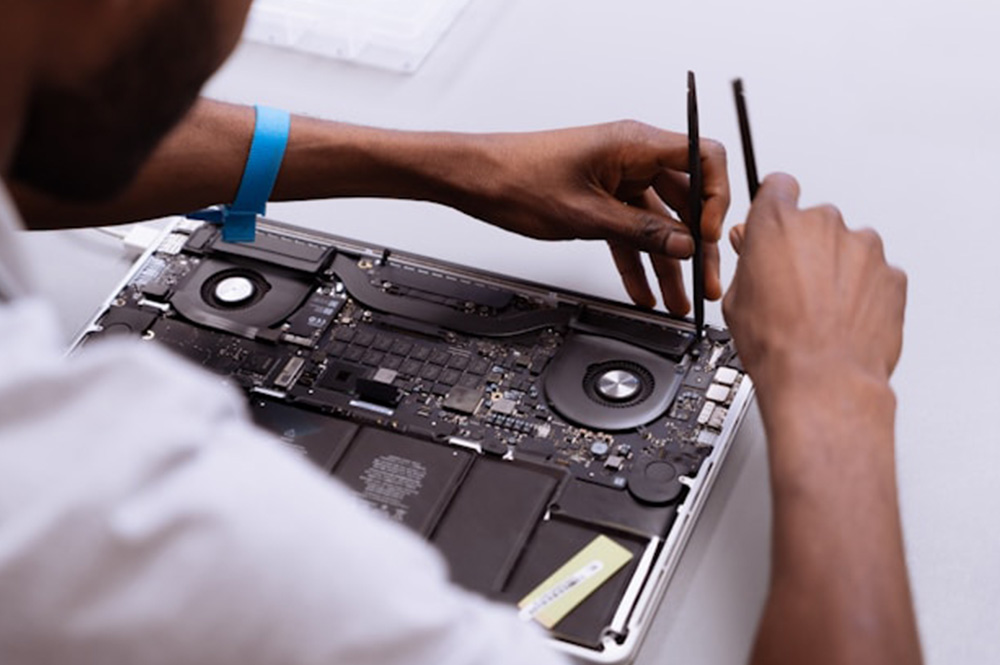
Why Professional Repair Matters for Your MacBook

MacBooks like the Early 2016 model feature compact, integrated components. Improper repair can lead to:

Display or touch issues

Keyboard or power system damage

Connectivity and charging failures

Long‑term reliability problems

Expert repair ensures accurate diagnostics, safe handling, and consistent performance for your device.

Frequently Asked Questions

1. How do I know if my MacBook battery needs replacement?
Common signs include rapid battery drain, swelling, the MacBook not charging, or unexpected shutdowns. Our service center performs battery health diagnostics to determine if replacement is needed.

A cracked, flickering, or blank display can be replaced safely at a professional service center. We perform full display assembly replacement, calibration, and post-repair testing to ensure proper functionality.

Yes, accidental spills or liquid exposure can often be repaired. Our technicians inspect internal components, clean corrosion, and restore affected parts to prevent long-term damage.
Yes. USB‑C port issues such as looseness, intermittent charging, or power detection problems can be repaired by port cleaning, inspection, or replacement. Power and data functionality are tested after repair.

MacBook 2016 features a compact and tightly integrated design. Professional repair ensures accurate diagnostics, safe handling, and restores display, keyboard, battery, USB‑C, and internal systems without risking long-term damage.

What do I get from my MacBook repair?

Call Us for Apple Door Step Support

We provide a door step service for your MacBook repair and service at dhoa, so no matter where you are, there is no excuse to not choose Apple Service and Repairs Center Way To Fix MacBook repair service in qatar

100% Quality Parts

Our parts are of the highest quality and this allows us to offer you a limited warranty on the device for all parts, except the battery

No Minimum Services Charges

Diagnosis of your device is absolutely free of cost and there are no hidden charges whatsoever, for door step service contact us to get your device fixed.

Apple Premium service Centre

Apple Service and Repairs Center Way To Fix is the fastest and the best rated service provider for all Apple Service in Doha and Qatar. Select the device and the issue you wish to get repaired and watch how we bring your device back to life!

×